



USB Response Pad
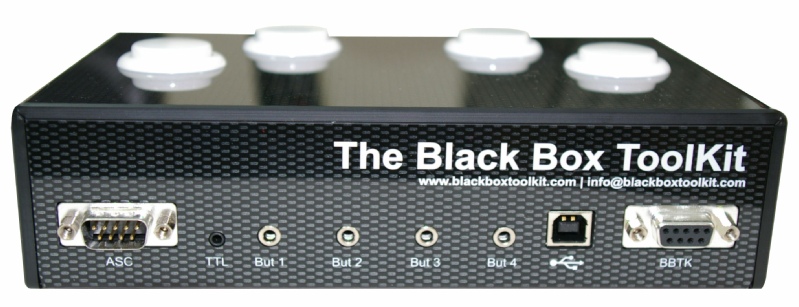
Rear connectors



|
Connector |
What does it do |
How can I use it |
|
ASC or Active Switch Closure (male 9- |
When you press a button up to 4x ASC leads can close buttons on your own response device in 0.4 of a millisecond. The small delay is because we use Solid State Relays (SSR) to protect your equipment and they introduce an inherent delay. |
If you connected one ASC lead to a button on your own response device when you pressed the corresponding button on the BBTK response pad it would be like pressing the button on your own response device. |
|
TTL (2.5 mm stereo socket) |
When a button is pressed a 50 ms wide TTL pulse is sent to this socket. This can either be a positive or negative pulse depending on which signal line you use. |
This is ideal for event marking of true response times or for time audit, e.g. in EEG, connection to a BBTK etc. |
|
But 1 to 4 (3.5 mm mono sockets) |
Up to 4x external buttons of your own can be used. [physically mapped to buttons 1- |
When you connect your own push- |
|
USB (USB 'B' square socket to PC 'A' flat) |
Connects to the PC you want to accept responses on. |
Each button sends a standard keydown response as might a normal keyboard if you pressed keys 1- |
|
BBTK (female 9- |
4x TTL lines connect to the BBTK via this connector. If you are using a BBTK v2 when you press a button a +5V TTL event (onset, duration and offset) is captured by the BBTK for time audit purposes. [physically mapped to buttons 1- |
When connected to the BBTK v2 if a button is pressed a keystroke is sent to the computer you are running your experiment on. Simultaneously a TTL event marker is sent to the BBTK which logs the button press in terms of onset, duration and offset. It is also possible to use these +5V signals to event mark on EEG and for time audit purposes. |
click on the image to enlarge